Celestia - Explore the Universe
Celestia is a space simulator that lets you travel in our universe. You can explore the entire solar system and even go beyond our galaxy. Celestia doesn't just show you the sky, it lets you view the universe from any point you want. If you are familiar with Google Earth, it will be easy to use the program.You can capture images and record videos, so you can use the program for your school projects. The program is also useful to learn information about planets, satellites and stars.If Google Earth has Sketchup and 3D Warehouse, Celestia has Motherlode, a repository for 3D models and textures.Celestia is open-source and it runs on Windows, Mac and Linux. After running the program for the first time, go to Help / Run Demo and select the full-screen mode.
Wednesday, September 27, 2006
Monday, September 25, 2006
World Satellite Image
World GeoCover Satellite Image - This is an high resolution satellite imagery, useful for Presentation and Posters
World GeoCover Satellite Image - This is an high resolution satellite imagery, useful for Presentation and Posters
Sunday, September 24, 2006
Backup and Restore Your PC: Back Up E-Mails in Outlook Express 6 : Yahoo! Tech
Backup and Restore Your PC: Back Up E-Mails in Outlook Express 6 : Yahoo! Tech
Outlook Express emails are stored in a file with extention .dbx, under the following directory
C:\Documents and Settings\\Local Settings\Application Data\Identities\{D3235ACB-9DA9-40E7-8BA6-CEE336D68083}\Microsoft\Outlook Express.
This location can be found out by this option in Outlook
click - Tools - Options - maintenance tab and click Store Folder
which will show you the folder where dbx file are stored.
browse to that folder and copy the dbx file to an safe location
Your emails are important, backup them.
Outlook Express emails are stored in a file with extention .dbx, under the following directory
C:\Documents and Settings\
This location can be found out by this option in Outlook
click - Tools - Options - maintenance tab and click Store Folder
which will show you the folder where dbx file are stored.
browse to that folder and copy the dbx file to an safe location
Your emails are important, backup them.
Improve PC Performance: Tune Up Windows : Yahoo! Tech
Improve PC Performance: Tune Up Windows : Yahoo! Tech
Computer works superbly when its first hand over to you after the OS and the initial programs are installed, gradually we find it slowing down, this happens because we keep installing software's to either test it out or use it once in a while and forget that its there, these programs utilse the memory which is key to run our computer at optimal speed.
Get rid of those s/w which you no more need it
Clean up your hard disk
Update your patches regular
Keep your virus definition file uptodate
Then your system will cruise along with you :)
Computer works superbly when its first hand over to you after the OS and the initial programs are installed, gradually we find it slowing down, this happens because we keep installing software's to either test it out or use it once in a while and forget that its there, these programs utilse the memory which is key to run our computer at optimal speed.
Get rid of those s/w which you no more need it
Clean up your hard disk
Update your patches regular
Keep your virus definition file uptodate
Then your system will cruise along with you :)
Friday, September 08, 2006
HP India - Support Service
We use several HP Printers in our office all are under warrant, Support pack or AMC.
First calling to HP toll free from an non BSNL phone is not possible, now that they have number 30306363, I have to try several
time to get thru.
Now when you have your call attended, you provide your serial number if the printer is under Warranty which 1 year from the data of purchase
we have no problem, in case its under Support Pack or AMC, the next answer from the person is, sorry your printer is not under Warranty or AMC,
Then you will have to say its under support pack, then they will ask you Support Pack number, from which vendor you have taken the support pack details.
After good 2 to 3 days they will trace our support pack details and they decide to send an engineer to the office.
The engineer will again take 2 days to locate our office, because the document he gets had address of the Vendor thru who I purchased the printer and not our address.
For an 4hr response time support pack the call will be attended after 4 days.
Only good thing about HP, is the engineer who visits the site, once you get the engineer to the site, then your problem will be solved.
So guys, when you call HP Support make sure you have all the serial number, support pack number, printer model, printer model number only then you can expect response from them.
Lucky we just have only HP printers and not HP server.
First calling to HP toll free from an non BSNL phone is not possible, now that they have number 30306363, I have to try several
time to get thru.
Now when you have your call attended, you provide your serial number if the printer is under Warranty which 1 year from the data of purchase
we have no problem, in case its under Support Pack or AMC, the next answer from the person is, sorry your printer is not under Warranty or AMC,
Then you will have to say its under support pack, then they will ask you Support Pack number, from which vendor you have taken the support pack details.
After good 2 to 3 days they will trace our support pack details and they decide to send an engineer to the office.
The engineer will again take 2 days to locate our office, because the document he gets had address of the Vendor thru who I purchased the printer and not our address.
For an 4hr response time support pack the call will be attended after 4 days.
Only good thing about HP, is the engineer who visits the site, once you get the engineer to the site, then your problem will be solved.
So guys, when you call HP Support make sure you have all the serial number, support pack number, printer model, printer model number only then you can expect response from them.
Lucky we just have only HP printers and not HP server.
Monday, September 04, 2006
Dell Support Service in India by Females
When ever I call Dell Support number in India, if the call is attended by an female member,
then I have never got a solution, when its an male there is an instant solution. Why is it so, I am sure the same training is provided to all at Dell.
No I am not against female providing support, they are very good when you come to Banking sector but computing support I cannot give them any points.
Let me know if any one else have faced such problem, leave your feedback in the comments section.
then I have never got a solution, when its an male there is an instant solution. Why is it so, I am sure the same training is provided to all at Dell.
No I am not against female providing support, they are very good when you come to Banking sector but computing support I cannot give them any points.
Let me know if any one else have faced such problem, leave your feedback in the comments section.
Friday, September 01, 2006
HDD Data Recovery Services Bangalore
Contact details of Stellar Bangalore- an Hard disk data recovery people.
They were able to recover my data from an CMS (PCIMCI Slot based hard disk) and today have sent an desktop HDD
which just crashed for no reason, getting the replacement from Dell, but needed couple of configuration files for one particular software.
Stellar came back mentioning that there was an Physical damage to the 20GB Western Digital harddisk and it has to be sent to there Delhi office for data recovery and the charges to recover was exorbitant Rs.18,500/- the refused to reduce the cost, finally I had to take back the hard disk and try with alternate vendor.
Stellar Bangalore
S-712, South Block, Manipal Centre, Dickenson Road, Bangalore 560042 (INDIA).
(+91)-80-2532 78652532 7866
blorelab@stellarinfo.com
Map Detail
They were able to recover my data from an CMS (PCIMCI Slot based hard disk) and today have sent an desktop HDD
which just crashed for no reason, getting the replacement from Dell, but needed couple of configuration files for one particular software.
Stellar came back mentioning that there was an Physical damage to the 20GB Western Digital harddisk and it has to be sent to there Delhi office for data recovery and the charges to recover was exorbitant Rs.18,500/- the refused to reduce the cost, finally I had to take back the hard disk and try with alternate vendor.
Stellar Bangalore
S-712, South Block, Manipal Centre, Dickenson Road, Bangalore 560042 (INDIA).
(+91)-80-2532 78652532 7866
blorelab@stellarinfo.com
Map Detail
Friday, August 25, 2006
Free Logo and Graphics Generator
Cool Text: Logo and Graphics Generator
Useful site for generating Logo, Buttons for your website and its free
they just request us to add a link, and that too is optional.
Useful site for generating Logo, Buttons for your website and its free
they just request us to add a link, and that too is optional.
Monday, August 21, 2006
Dell Battery Return Program
Dell Battery Return Program:
List of Dell Laptop series affected by the battery replacement.
"Latitude: D410, D500, D505, D510, D520, D600, D610, D620, D800, D810
Inspiron: 500M, 510M, 600M, 700M, 710M, 6000, 6400, 8500, 8600, 9100, 9200, 9300, 9400, E1505, E1705
Precision: M20, M60, M70, M90
XPS: XPS, XPS Gen2, XPS M170, XPS M1710 "
The following battery models, may be subject to recall:
1K055
C5340
D6024
JD616
U5867
X5333
3K590
C5446
D6025
JD617
U5882
X5875
5P474
C6269
F2100
KD494
W5915
X5877
6P922
C6270
F5132
M3006
X5308
Y1333
C2603
D2961
GD785
RD857
X5329
Y4500
C5339
D5555
H3191
TD349
X5332
Y5466
These part numbers are printed on the back of the battery packs.
List of Dell Laptop series affected by the battery replacement.
"Latitude: D410, D500, D505, D510, D520, D600, D610, D620, D800, D810
Inspiron: 500M, 510M, 600M, 700M, 710M, 6000, 6400, 8500, 8600, 9100, 9200, 9300, 9400, E1505, E1705
Precision: M20, M60, M70, M90
XPS: XPS, XPS Gen2, XPS M170, XPS M1710 "
The following battery models, may be subject to recall:
1K055
C5340
D6024
JD616
U5867
X5333
3K590
C5446
D6025
JD617
U5882
X5875
5P474
C6269
F2100
KD494
W5915
X5877
6P922
C6270
F5132
M3006
X5308
Y1333
C2603
D2961
GD785
RD857
X5329
Y4500
C5339
D5555
H3191
TD349
X5332
Y5466
These part numbers are printed on the back of the battery packs.
Wednesday, August 16, 2006
Google Calculator
Google Search
I just found out that you can also use Google Search to make calculation, yes you can use Google search as an calculator
Just type 5*5 and enter to get the answer, Google - ur bombat maga :)
I just found out that you can also use Google Search to make calculation, yes you can use Google search as an calculator
Just type 5*5 and enter to get the answer, Google - ur bombat maga :)
Monday, August 14, 2006
How do I configure the default keyboard layout during login?
During XP installation had selected my Language as English (UK) and the keyboard was also set to the English (UK) while my keyboard was English (US), so it didn't take the @ symbol and I had this key in my pwd, couldn't login using that account bcoz when i keyed in shift 2 for @, it was taking ", got if rectified by updating the registry key below are the details.
You can change the keyboard layout using the keyboard control panel applet (start - settings - control panel - keyboard - Input Locales) however this does not affect the layout used during logon (which is by default English (United States)). To change this perform the following:
Start the registry editor (regedit.exe)
Move to HKEY_USERS\.DEFAULT\Keyboard Layout\Preload
Double click on 1 and change the number to your local layout (you could get this by looking at HKEY_CURRENT_USER\Keyboard Layout\Preload1). Click OK
You may also change HKEY_USERS\.DEFAULT\Control Panel\International\Locale to this value however it is not mandatory to do so.
Close the registry editor
Logoff and then on again
Make sure you select a country code that has been installed via the control panel or your system will not boot.
A table of the codes to the countries is given below:
00000402 - Bulgarian
0000041a - Croatian
00000405 - Czech
00000406 - Danish
00000413 - Dutch (Standard)
00000813 - Dutch (Belgian)
00000409 - English (United States)
00000809 - English (United Kingdom)
00001009 - English (Canadian)
00001409 - English (New Zealand)
00000c09 - English (Australian)
0000040b - Finnish
0000040c - French (Standard)
0000080c - French (Belgian)
0000100c - French (Swiss)
00000c0c - French (Canadian)
00000407 - German (Standard)
00000807 - German (Swiss)
00000c07 - German (Austrian)
00000408 - Greek
0000040e - Hungarian
0000040f - Icelandic
00001809 - English (Irish)
00000410 - Italian (Standard)
00000810 - Italian (Swiss)
00000414 - Norwegian (Bokmal)
00000814 - Norwegian (Nynorsk)
00000415 - Polish
00000816 - Portuguese (Standard)
00000416 - Portuguese (Brazilian)
00000418 - Romanian
00000419 - Russian
0000041b - Slovak
00000424 - Slovenian
0000080a - Spanish (Mexican)
0000040a - Spanish (Traditional Sort)
00000c0a - Spanish (Modern Sort)
0000041d - Swedish
0000041f - Turkish
These can also be seen in the registry at HKEY_LOCAL_MACHINE\SYSTEM\CurrentControlSet\Control\Keyboard Layout\DosKeybCodes
You can change the keyboard layout using the keyboard control panel applet (start - settings - control panel - keyboard - Input Locales) however this does not affect the layout used during logon (which is by default English (United States)). To change this perform the following:
Start the registry editor (regedit.exe)
Move to HKEY_USERS\.DEFAULT\Keyboard Layout\Preload
Double click on 1 and change the number to your local layout (you could get this by looking at HKEY_CURRENT_USER\Keyboard Layout\Preload1). Click OK
You may also change HKEY_USERS\.DEFAULT\Control Panel\International\Locale to this value however it is not mandatory to do so.
Close the registry editor
Logoff and then on again
Make sure you select a country code that has been installed via the control panel or your system will not boot.
A table of the codes to the countries is given below:
00000402 - Bulgarian
0000041a - Croatian
00000405 - Czech
00000406 - Danish
00000413 - Dutch (Standard)
00000813 - Dutch (Belgian)
00000409 - English (United States)
00000809 - English (United Kingdom)
00001009 - English (Canadian)
00001409 - English (New Zealand)
00000c09 - English (Australian)
0000040b - Finnish
0000040c - French (Standard)
0000080c - French (Belgian)
0000100c - French (Swiss)
00000c0c - French (Canadian)
00000407 - German (Standard)
00000807 - German (Swiss)
00000c07 - German (Austrian)
00000408 - Greek
0000040e - Hungarian
0000040f - Icelandic
00001809 - English (Irish)
00000410 - Italian (Standard)
00000810 - Italian (Swiss)
00000414 - Norwegian (Bokmal)
00000814 - Norwegian (Nynorsk)
00000415 - Polish
00000816 - Portuguese (Standard)
00000416 - Portuguese (Brazilian)
00000418 - Romanian
00000419 - Russian
0000041b - Slovak
00000424 - Slovenian
0000080a - Spanish (Mexican)
0000040a - Spanish (Traditional Sort)
00000c0a - Spanish (Modern Sort)
0000041d - Swedish
0000041f - Turkish
These can also be seen in the registry at HKEY_LOCAL_MACHINE\SYSTEM\CurrentControlSet\Control\Keyboard Layout\DosKeybCodes
Saturday, August 05, 2006
Wikimapia - Let's describe the whole Earth!
Wikimapia - Let's describe the whole Earth!
Power of Google Earth minus the installation of the Google earth, you don't need google earn installed to vew the maps, visit this site and an advantage is you can search for any place which already available in their database
Power of Google Earth minus the installation of the Google earth, you don't need google earn installed to vew the maps, visit this site and an advantage is you can search for any place which already available in their database
Monday, April 17, 2006
You cannot open a new Internet Explorer window or nothing occurs after you click a link
You cannot open a new Internet Explorer window or nothing occurs after you click a link
A user was unable to open pop menu or open in new sheet from IE, the system was a new build OS Windows XP SP2, Solution in the above link solved the problem
A user was unable to open pop menu or open in new sheet from IE, the system was a new build OS Windows XP SP2, Solution in the above link solved the problem
Tuesday, February 14, 2006
AOL SJ celebration live webcast
Those who wanted to come to the celebration, but couldn't make it,
check out the webcast, register yourself  at www.silverjubilee.org
AOL SJ Venue view from Space

Satellite image of Art Of Living Silver Jubilee venue Jakkur Airfield, click the photo to view enlarged image.
Source : Google Earth
AOL Silver Jubilee Venue 360deg photo
Click the link to view Art of Living SJ Celebration Venue Jakkur Airfield 360deg view
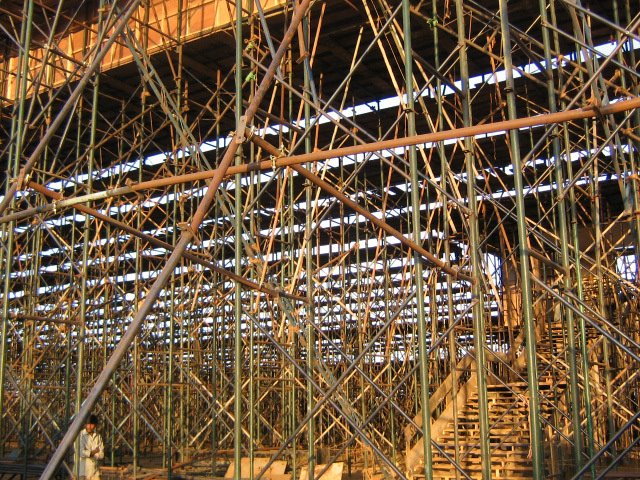
Made an effort to create an 360deg view of the venue standing on the main stage. This is how it will look like if you stand on the main stage of AOL Silver Jubilee venue at Jakkur Airfield, this photo was taken on 14th Feb, 3 days before the celebration, work is still under progress.
Had plans to generate a similar photo on the celebration day, sorry can't do it, Photography is strictly prohibited.
If you have any problems in viewing / downloading the image, visit after an hour, this happens if there is sudden load to download the photo.
Made an effort to create an 360deg view of the venue standing on the main stage. This is how it will look like if you stand on the main stage of AOL Silver Jubilee venue at Jakkur Airfield, this photo was taken on 14th Feb, 3 days before the celebration, work is still under progress.
Had plans to generate a similar photo on the celebration day, sorry can't do it, Photography is strictly prohibited.
If you have any problems in viewing / downloading the image, visit after an hour, this happens if there is sudden load to download the photo.



Wednesday, January 18, 2006
Sanskrit style fonts

Samarkan - English in Sanskrit style font Download the font from this site
For list of various such font, check out this site - http://www.salagram.net/fonts.htm
At home, no background music.
My son is watching Tom & Jerry on Cartoon Network :)
Wednesday, January 04, 2006
Mapinfo 2 Google MBX Utility
Download Mapinfo 2 Google
Found this tool (MBX) to convert Mapinfo tables to Google Earth (KML) files.
Now you can overlay your tables on Google earth and also share it with others.
To download click the link above.
Cheers
No background music today :-(
Found this tool (MBX) to convert Mapinfo tables to Google Earth (KML) files.
Now you can overlay your tables on Google earth and also share it with others.
To download click the link above.
Cheers
No background music today :-(
Thursday, June 09, 2005
Office 2000 Correct Flipped Pictures Add-in
Office 2000 Correct Flipped Pictures Add-in
WMF Image instered in an earlier version of word, when opened in Word 2000.
Images were appearing flipped.
Downloaded this tool, installed it, when I opened the above mentioned document, still the images were flipped.
Selected the image in word, Right click and clicked "Edit Picture", it takes to edit picture windows,
Now just click Close Picture, now the flipped image was corrected and displayed as original images.
WMF Image instered in an earlier version of word, when opened in Word 2000.
Images were appearing flipped.
Downloaded this tool, installed it, when I opened the above mentioned document, still the images were flipped.
Selected the image in word, Right click and clicked "Edit Picture", it takes to edit picture windows,
Now just click Close Picture, now the flipped image was corrected and displayed as original images.
Subscribe to:
Posts (Atom)