Those who wanted to come to the celebration, but couldn't make it,
check out the webcast, register yourself  at www.silverjubilee.org
Tuesday, February 14, 2006
AOL SJ celebration live webcast
AOL SJ Venue view from Space

Satellite image of Art Of Living Silver Jubilee venue Jakkur Airfield, click the photo to view enlarged image.
Source : Google Earth
AOL Silver Jubilee Venue 360deg photo
Click the link to view Art of Living SJ Celebration Venue Jakkur Airfield 360deg view
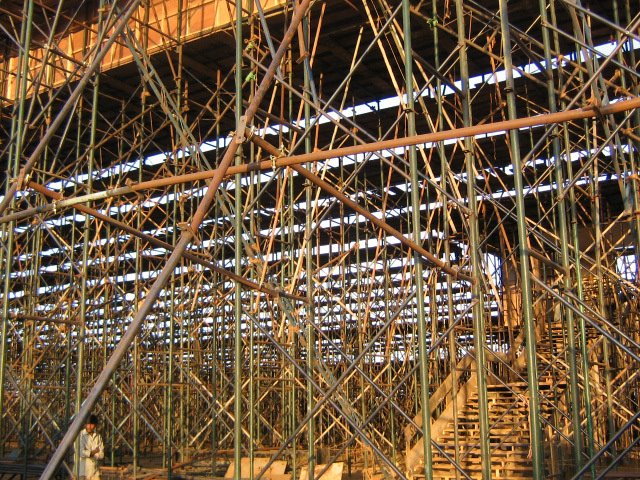
Made an effort to create an 360deg view of the venue standing on the main stage. This is how it will look like if you stand on the main stage of AOL Silver Jubilee venue at Jakkur Airfield, this photo was taken on 14th Feb, 3 days before the celebration, work is still under progress.
Had plans to generate a similar photo on the celebration day, sorry can't do it, Photography is strictly prohibited.
If you have any problems in viewing / downloading the image, visit after an hour, this happens if there is sudden load to download the photo.
Made an effort to create an 360deg view of the venue standing on the main stage. This is how it will look like if you stand on the main stage of AOL Silver Jubilee venue at Jakkur Airfield, this photo was taken on 14th Feb, 3 days before the celebration, work is still under progress.
Had plans to generate a similar photo on the celebration day, sorry can't do it, Photography is strictly prohibited.
If you have any problems in viewing / downloading the image, visit after an hour, this happens if there is sudden load to download the photo.



Wednesday, January 18, 2006
Sanskrit style fonts

Samarkan - English in Sanskrit style font Download the font from this site
For list of various such font, check out this site - http://www.salagram.net/fonts.htm
At home, no background music.
My son is watching Tom & Jerry on Cartoon Network :)
Wednesday, January 04, 2006
Mapinfo 2 Google MBX Utility
Download Mapinfo 2 Google
Found this tool (MBX) to convert Mapinfo tables to Google Earth (KML) files.
Now you can overlay your tables on Google earth and also share it with others.
To download click the link above.
Cheers
No background music today :-(
Found this tool (MBX) to convert Mapinfo tables to Google Earth (KML) files.
Now you can overlay your tables on Google earth and also share it with others.
To download click the link above.
Cheers
No background music today :-(
Thursday, June 09, 2005
Office 2000 Correct Flipped Pictures Add-in
Office 2000 Correct Flipped Pictures Add-in
WMF Image instered in an earlier version of word, when opened in Word 2000.
Images were appearing flipped.
Downloaded this tool, installed it, when I opened the above mentioned document, still the images were flipped.
Selected the image in word, Right click and clicked "Edit Picture", it takes to edit picture windows,
Now just click Close Picture, now the flipped image was corrected and displayed as original images.
WMF Image instered in an earlier version of word, when opened in Word 2000.
Images were appearing flipped.
Downloaded this tool, installed it, when I opened the above mentioned document, still the images were flipped.
Selected the image in word, Right click and clicked "Edit Picture", it takes to edit picture windows,
Now just click Close Picture, now the flipped image was corrected and displayed as original images.
Monday, May 02, 2005
Mission BunNet
Today is 4th day of my trip at our MP project site, entire project site computer network was down, minor problem was their since one week, but last 2 days, nothing was working.
No email
No Internet
No Network
No Printer
at this site phone hardly works, even that was dead :-(
I don't have to say that the project leader was frustated at a very crucial stage of the the project.
had to rush to the site to fixup the problem, in my 3 years of IT experience, this was my first such trip, on a critical mission when the entier network was down, I had to bring it up quickly and go back to main office, was not sure how much time it would take to find out the root cause of the problem, which has brought down entier network and stopped all type of communication to the outside world.
For internet, this site uses a VSAT connection provided by HECL, India
Reached project site on 29th April 2005, Friday evening, had a look at the network, only one laptop was connected directly to the VSAT unit and all were using this to access their emails.
Files were trasfered from one system to other using a Flash drive.
Recently the office was expanded one more room was added, to which few CAT5 cables were layed out from the switch to the workstation tables.
It was late evening when I reached when I reached the camp, went to bed, planned the action to take up the next day, first place to be tested was the new cables setup in the office, VSAT status, a call was logged with HECL who had sent a field engineer for testing, the engineer was on site when I reached. There was miss allignment of the VSAT anteena, which was corrected, VSAT was working fine, tested the internet speed, it was at a decent speed, latency to google.com was around 1500ms (yes this is the latency what we get at this site), at best we get 1000ms latency at this site when ping to google.com
Removed all the CAT5 cables from the office, tested by connecting one end to laptop and other end to switch, except one cable, none were working, it was crimped in the wrong order, luckily I had brought my crimping tool and RJ45 connector, reason I said luckily because if I had not got the connectors I had to wait for one more day to get them, the site is in such remote location, for which we do not have time, recrimpled all the cables and fixed the issue.
CAT5 crimping colour code sequence:
white/orange, orange, white/green, blue, white/blue, green, white/brown, brown
Still I was not able to understand is
In star topology if one cable is not working, that should not bring down the entire network, this happens on only bus or ring topology.
Other reason for which the network was down was, the network was a peer to peer network, which can handle only 10 concurrent connections, last week we had about 12 computers on the network which might be the reason for the network going down.
As I said we have a peer to peer network and we do not provide static IP address for our computers, we didn't have a DHCP server in the network, we used the VSAT DW6000 unit which had option of enabling DHCP services so that network computer can get IP address from that unit, we had a range of 15 IP address which we could use, if the DW6000 unit is disconnected from the network, then computers on the network will continue to work until its restarted, once restarted, it tries to get an IP address from DHCP server, if not found then windows XP gives and AIPA (Autoconfig IP Addressing) in a different subnet mask then the VSAT IP address range, this conflicts and the computers can't talk to each other.
Connection between the computers can be re-established only if all the computers get an AIPA, which can be done, by restarting the computers.
This works for Windows XP computers, but for network printers, it can't get an automatic IP address, hence network printers goes down. I could have given an static IP address, but the DHCP service from the DW6000 had a limitation, we couldn't reserve a range of IP address, without a range, would create an IP address conflict, hence left to get dynamic IP address for network printers.
Solution for the network printer was, connected this plotter to LPT1 on one of the computer and shared it, when we do this, its does not require an IP address.
This sorted out the main problem and the network was up and working, this blog may sound that the work was simple, NO it was not an easy task, had to put double effort to complete it on time.
Prepared a comprehsive document for this network, hopping that users in the site will use when trouble arises, do you thing they will have time to go through this document, hope so ;-)
MCSE 2003 training
Presently I am doing my Windows XP client paper, more than the training the exams dumps provided is useful, it helped me in understading the network better.
Good nite have to complete the documentation and go to bed
Cheers- MSB
No email
No Internet
No Network
No Printer
at this site phone hardly works, even that was dead :-(
I don't have to say that the project leader was frustated at a very crucial stage of the the project.
had to rush to the site to fixup the problem, in my 3 years of IT experience, this was my first such trip, on a critical mission when the entier network was down, I had to bring it up quickly and go back to main office, was not sure how much time it would take to find out the root cause of the problem, which has brought down entier network and stopped all type of communication to the outside world.
For internet, this site uses a VSAT connection provided by HECL, India
Reached project site on 29th April 2005, Friday evening, had a look at the network, only one laptop was connected directly to the VSAT unit and all were using this to access their emails.
Files were trasfered from one system to other using a Flash drive.
Recently the office was expanded one more room was added, to which few CAT5 cables were layed out from the switch to the workstation tables.
It was late evening when I reached when I reached the camp, went to bed, planned the action to take up the next day, first place to be tested was the new cables setup in the office, VSAT status, a call was logged with HECL who had sent a field engineer for testing, the engineer was on site when I reached. There was miss allignment of the VSAT anteena, which was corrected, VSAT was working fine, tested the internet speed, it was at a decent speed, latency to google.com was around 1500ms (yes this is the latency what we get at this site), at best we get 1000ms latency at this site when ping to google.com
Removed all the CAT5 cables from the office, tested by connecting one end to laptop and other end to switch, except one cable, none were working, it was crimped in the wrong order, luckily I had brought my crimping tool and RJ45 connector, reason I said luckily because if I had not got the connectors I had to wait for one more day to get them, the site is in such remote location, for which we do not have time, recrimpled all the cables and fixed the issue.
CAT5 crimping colour code sequence:
white/orange, orange, white/green, blue, white/blue, green, white/brown, brown
Still I was not able to understand is
In star topology if one cable is not working, that should not bring down the entire network, this happens on only bus or ring topology.
Other reason for which the network was down was, the network was a peer to peer network, which can handle only 10 concurrent connections, last week we had about 12 computers on the network which might be the reason for the network going down.
As I said we have a peer to peer network and we do not provide static IP address for our computers, we didn't have a DHCP server in the network, we used the VSAT DW6000 unit which had option of enabling DHCP services so that network computer can get IP address from that unit, we had a range of 15 IP address which we could use, if the DW6000 unit is disconnected from the network, then computers on the network will continue to work until its restarted, once restarted, it tries to get an IP address from DHCP server, if not found then windows XP gives and AIPA (Autoconfig IP Addressing) in a different subnet mask then the VSAT IP address range, this conflicts and the computers can't talk to each other.
Connection between the computers can be re-established only if all the computers get an AIPA, which can be done, by restarting the computers.
This works for Windows XP computers, but for network printers, it can't get an automatic IP address, hence network printers goes down. I could have given an static IP address, but the DHCP service from the DW6000 had a limitation, we couldn't reserve a range of IP address, without a range, would create an IP address conflict, hence left to get dynamic IP address for network printers.
Solution for the network printer was, connected this plotter to LPT1 on one of the computer and shared it, when we do this, its does not require an IP address.
This sorted out the main problem and the network was up and working, this blog may sound that the work was simple, NO it was not an easy task, had to put double effort to complete it on time.
Prepared a comprehsive document for this network, hopping that users in the site will use when trouble arises, do you thing they will have time to go through this document, hope so ;-)
MCSE 2003 training
Presently I am doing my Windows XP client paper, more than the training the exams dumps provided is useful, it helped me in understading the network better.
Good nite have to complete the documentation and go to bed
Cheers- MSB
Wednesday, February 02, 2005
Mail disappears when its read in Outlook Web Access (OWA) or Webmail
AdminLife : OWA : When replying to an e-mail it disappears... on microsoft.public.exchange.clients
A remote user called up saying his mails are getting deleted once he read it, when logged into the user found only unread mails in his inbox.
The user was access web mail using Outlook Web Access, in OWA there are hardly any settings, which can move mails to a different folder.
When opened up his mailbox in Microsoft Outlook all mails were visible, this assured that his mails were not deleted.
Again logged on to his web mail, checked his View settings was select to "Unread Messages" changed this to "Messages" displayed all the mails
Strange problems, this would take up my time if not google was there, a google search gave me the solution :)
A remote user called up saying his mails are getting deleted once he read it, when logged into the user found only unread mails in his inbox.
The user was access web mail using Outlook Web Access, in OWA there are hardly any settings, which can move mails to a different folder.
When opened up his mailbox in Microsoft Outlook all mails were visible, this assured that his mails were not deleted.
Again logged on to his web mail, checked his View settings was select to "Unread Messages" changed this to "Messages" displayed all the mails
Strange problems, this would take up my time if not google was there, a google search gave me the solution :)
Thursday, November 04, 2004
Plotting was slow on HP DesignJet 1050C
HP DesignJet 1050C was not plotting at its normall speed, it was defentely taking triple time it normally takes, and even the Ink try time was 3 minutes, when I checked the paper type in the plotter panel, it mentioned High Photo Glossy, where as the media was Coated Paper, this was the reason.
Cancelled all printing process and changed the Paper type to Coated Paper and started the plotting process again, its working at its normal speed.
Location:
Bangalore Whitefield office, very busy with our MP project.
Bacgroupd Music:
Shiva Manasa Puja, Track 1
Cancelled all printing process and changed the Paper type to Coated Paper and started the plotting process again, its working at its normal speed.
Location:
Bangalore Whitefield office, very busy with our MP project.
Bacgroupd Music:
Shiva Manasa Puja, Track 1
Wednesday, November 03, 2004
Dell C600 Latitude unable to take Group Policy
Upgraded Dell Latitude C600 from W2K to XP, was working fine, when we implemented Group Policy and try to deploy XP SP2 using Group Policy, this particular system was not taking the group policy.
Update the Network adapter drivers using the Dell Driver CD, it started to work fine.
Cheers :-)
Update the Network adapter drivers using the Dell Driver CD, it started to work fine.
Cheers :-)
Friday, September 10, 2004
Water-mark in MS Word document
Roger,
this will let you embed the word "confidential" in your document
Add a water-mark to a printed document
To print a water-mark you must insert it into a header or footer. The water-mark is printed wherever you place it on the page - it doesn't have to be confined to the area at the top or bottom of the page.
On the View menu, click Header and Footer.
On the Header and Footer toolbar, click Show/Hide Document Text to hide the text and graphics in the main document.
Insert a graphic - a drawing object such as an clip art, Word Art, or picture - or insert a text box.
On the Header and Footer toolbar, click Close.
To view a water-mark as it will appear on the printed page, use print layout view or print preview
If the water-mark interferes with the legibility of the text on the page, you can lighten the object you used to create the water-mark
this will let you embed the word "confidential" in your document
Add a water-mark to a printed document
To print a water-mark you must insert it into a header or footer. The water-mark is printed wherever you place it on the page - it doesn't have to be confined to the area at the top or bottom of the page.
On the View menu, click Header and Footer.
On the Header and Footer toolbar, click Show/Hide Document Text to hide the text and graphics in the main document.
Insert a graphic - a drawing object such as an clip art, Word Art, or picture - or insert a text box.
On the Header and Footer toolbar, click Close.
To view a water-mark as it will appear on the printed page, use print layout view or print preview
If the water-mark interferes with the legibility of the text on the page, you can lighten the object you used to create the water-mark
Friday, September 03, 2004
Pick the first few characters in a cell : Excel Tip
Venkat or Geo cum community person had an excel spread sheet, which had a time column, where in it had timings in minutes written like
10 minutes
5 min
25 minutes, etc.
8 m
like this he had hundreds of records, he didn't wanted the words minutes, min, m he just need the number values in a adjacent cell
Solution
=left(text,num_char)
using this formula we can pick up the first 2 characters in that cell which will be the numbers and get rid of the string.
10 minutes
5 min
25 minutes, etc.
8 m
like this he had hundreds of records, he didn't wanted the words minutes, min, m he just need the number values in a adjacent cell
Solution
=left(text,num_char)
using this formula we can pick up the first 2 characters in that cell which will be the numbers and get rid of the string.
Thursday, July 29, 2004
Internal error: 31107 in Mapinfo
Spatial News MI-L Printing problem (FATAL: Internal error: 31107.) Archives
Krishna called me from the camp, he was facing a problem while printing/plotting Mapinfo workspace, He was getting an error "Internal Error 31107"
Checked the net and found that this error occurs when you have raster image with transparency in your workspace.
Option 1
Remove the transparency from the raster image and try printing
Option 2
Remove the raster image from the workspace and try printing
Krishna called me from the camp, he was facing a problem while printing/plotting Mapinfo workspace, He was getting an error "Internal Error 31107"
Checked the net and found that this error occurs when you have raster image with transparency in your workspace.
Option 1
Remove the transparency from the raster image and try printing
Option 2
Remove the raster image from the workspace and try printing
Wednesday, July 28, 2004
Deleting Printer drivers
Downloaded the latest printer drivers for my HP1050C plotter,
updated it on the print server, from then on my plots had black
patches on the print out.
Now I had to go back to the previous driver version, for this i had
2 delete the latest drivers from all my systems, how do I do that?
1. Remove the printer from you login and all other login
2. Login as user which has admin rights.
3. Open Printers & Faxes
4. Click File -> Server Properties
5. Select Driver tab
6. You will see a list of all printer drivers added to you computer
7. Delete the drrver which you don't need.
Once you delete the printer driver, now you can install the printer
by adding the older version printer drivers.
updated it on the print server, from then on my plots had black
patches on the print out.
Now I had to go back to the previous driver version, for this i had
2 delete the latest drivers from all my systems, how do I do that?
1. Remove the printer from you login and all other login
2. Login as user which has admin rights.
3. Open Printers & Faxes
4. Click File -> Server Properties
5. Select Driver tab
6. You will see a list of all printer drivers added to you computer
7. Delete the drrver which you don't need.
Once you delete the printer driver, now you can install the printer
by adding the older version printer drivers.
Wednesday, July 21, 2004
NDTV Cricket
NDTV Cricket
India vs Bangaladesh, Asia Cup, Srilanka
Bangladesh scored 178/10
India is bating at 42/1, shewag is out
India vs Bangaladesh, Asia Cup, Srilanka
Bangladesh scored 178/10
India is bating at 42/1, shewag is out
Picasa s/w
Just downloaded "Picassa" photo management software yesterday from google.com
found it useful for managing photos stored on my local harddisk.
It would be useful if I can manage photos on my network and share that album with
other users on the network, which is not possible with Picassa
found it useful for managing photos stored on my local harddisk.
It would be useful if I can manage photos on my network and share that album with
other users on the network, which is not possible with Picassa
Subscribe to:
Posts (Atom)